
ETK BMW PARTS CATALOG
Included
Digital Download Only
Instant digital download available immediately after payment. No physical product will be shipped.
Remote Installation
Free remote installation via AnyDesk if needed. We connect directly to your PC and install everything for you.
Description
The Official BMW Group Electronic Parts Catalogue
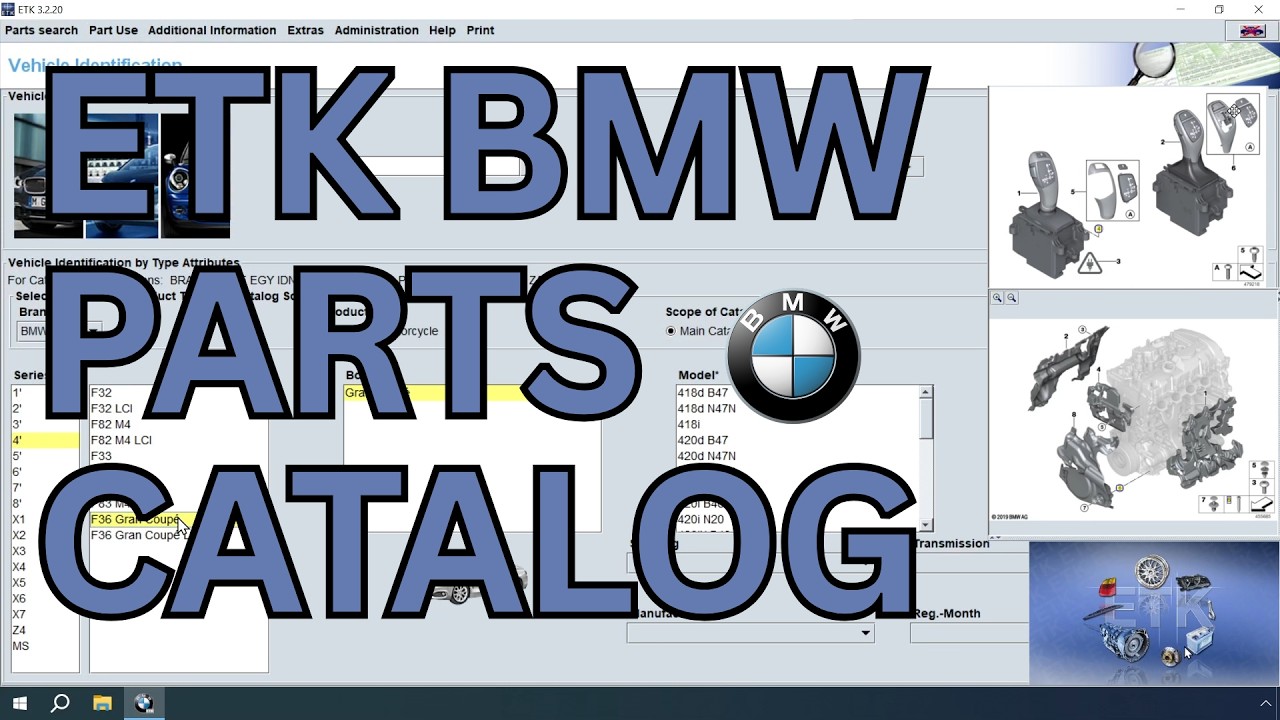
ETK (Elektronischer Teilekatalog) is the same software used by every authorised BMW, MINI, and Rolls-Royce dealership in the world to identify and order OEM parts. Search by VIN to instantly decode any BMW Group vehicle, browse high-resolution exploded diagrams, and pull the exact part number every single time — no more guesswork, no more wrong orders.
VIN Decoding
Enter a 7-digit short VIN or full 17-digit VIN — ETK instantly identifies the model code, build date, SA equipment codes, and shows only parts that fit.
Exploded Diagrams
High-resolution OEM technical drawings of every assembly — engine, chassis, body, electrical, interior — exactly as the BMW dealer sees them.
Exact OEM Part Numbers
Pull the precise factory part number for every component, with full supersession history so you order the latest revision every time.
Accessories & M Performance
Browse the full official BMW accessory range and M Performance Parts catalogue — with correct part numbers for every model and chassis.
Works Fully Offline
Once installed, ETK runs without internet — perfect for workshops, mobile mechanics, and parts traders working anywhere.
Multi-Language Interface
English, German, French, Spanish, Italian and more — switch language on the fly without reinstalling.
Every Vehicle in the BMW Group Catalogue
ETK covers the complete BMW Group lineup — passenger cars, M models, MINI, Rolls-Royce, and BMW Motorrad — from the early 1980s to current model year production.
BMW Passenger Cars
1, 2, 3, 4, 5, 6, 7, 8 Series — all chassis from E30, E36, E39, E46, E60, E90, F30, G20 through current G-series and U-series.
BMW X & Z
X1, X2, X3, X4, X5, X6, X7, XM, plus Z3, Z4, Z8 roadsters — full SAV and sports car coverage across all generations.
BMW i & M
i3, i4, i5, i7, iX, iX1, iX3 electric models, and the full M lineup — M2, M3, M4, M5, M8, X3M, X4M, X5M, X6M, XM.
MINI
Cooper, Cooper S, John Cooper Works, Clubman, Countryman, Convertible, Paceman, and the new MINI Electric range.
Rolls-Royce
Phantom, Ghost, Wraith, Dawn, Cullinan, and Spectre — full OEM parts data for every Goodwood-built model.
BMW Motorrad
R, S, K, F, G, C, and CE series motorcycles and scooters — full parts coverage including R 1250 GS, S 1000 RR, M 1000 RR, CE 04 and more.
Everything You Need to Get Started
Your BMW ETK purchase from OBDOLS comes with everything required to install, activate, and use the software professionally — no hidden extras, no surprise costs.
- ✓ Full BMW ETK software (latest available version)
- ✓ Complete international parts database (BMW, MINI, Rolls-Royce, Motorrad)
- ✓ Active license — instant activation
- ✓ Step-by-step installation video
- ✓ Free remote installation via AnyDesk
- ✓ Lifetime access to your purchased version
- ✓ Multi-language interface pack (EN, DE, FR, ES, IT and more)
- ✓ Personal email & live chat support — real human replies
From Purchase to Looking Up Parts in Minutes
No technical experience needed. Our installation video walks you through every step, and if you'd rather we did it for you, our free remote install via AnyDesk has you covered.
Place Your Order
Add BMW ETK to your cart and complete checkout. Secure payment, instant order confirmation by email.
Receive Instant Access
Within seconds you receive download links, your license, and the installation video — by email and inside your OBDOLS account dashboard.
Watch the Installation Video
Our short video shows the entire process — from download to first VIN search — clearly and in plain English.
Install & Activate
Follow the video step-by-step — or let us install it for you remotely via AnyDesk, completely free. Activation is instant.
Start Looking Up Parts
Open ETK, paste a BMW VIN, and pull exact OEM part numbers in seconds — exactly as the dealer does it.
We Don't Just Sell Software — We Make Sure It Works
Most software shops disappear after checkout. We do the opposite. From the second you order, you have a real person on the other end — ready to install, configure, and answer every question.
Free Remote Installation
Don't want to install it yourself? Send us a message after checkout and we connect to your PC via AnyDesk and install BMW ETK for you — completely free, no time limit, no hidden fee.
Step-by-Step Video
Prefer to do it yourself? Our installation video covers every click — download, install, activate, first search.
Live Chat & Email
Real human replies — usually within minutes. Ask before you buy, ask during install, ask weeks later. Always answered.
Lifetime Access
The version you buy is yours forever. No subscriptions, no expiry, no surprise lockouts.
What BMW Workshops & Parts Dealers Say
"I run a BMW specialist workshop and used RealOEM for years — half the time wrong supersessions, no SA code filtering. ETK from OBDOLS is dealer-grade. Real BMW data, VIN decoding works perfectly. Worth ten times the price."
"Installed via AnyDesk in 25 minutes. They did the entire setup while I made a coffee. VIN search on a customer's F31 returned the exact rear bumper carrier number first try. Saved me a trip to the BMW dealer."
"I sell BMW and MINI parts online and accuracy is everything. ETK has saved me dozens of returns by getting the correct part the first time. Instant delivery, fast install help, fair price. OBDOLS earned a customer for life."
Frequently Asked Questions
What is BMW ETK and what does it do?
ETK (Elektronischer Teilekatalog) is the official BMW Group electronic parts catalogue used by every authorised BMW, MINI, and Rolls-Royce dealer to identify and order genuine OEM parts. It supports VIN search, exploded diagrams, supersessions, and full fitment data.
ETK vs RealOEM — which is better?
ETK is the genuine dealer catalogue with complete, current data — including supersessions, SA equipment-code filtering, accessories, and M Performance parts. RealOEM is a free online viewer that lacks supersessions, equipment-code filtering, and is often slow to update. Professional BMW users always choose ETK.
Which brands and years does BMW ETK cover?
BMW passenger cars, BMW M models, BMW i electric range, BMW Motorrad motorcycles, MINI, and Rolls-Royce — from the early 1980s through current model year production. E, F, G, U, and i platforms all included.
Can I search by VIN number?
Yes — VIN search is ETK's most powerful feature. Enter the 7-digit short VIN or full 17-digit VIN and it identifies the exact model code, build date, SA equipment options, and filters parts to only what fits that car.
What are the system requirements?
Windows 10 or Windows 11 (64-bit), around 60 GB free disk space for full international data, 4 GB RAM minimum (8 GB recommended), and SSD storage for fast searches. Works on desktops and laptops.
How is BMW ETK delivered after I order?
Instantly by email and inside your OBDOLS account dashboard. You receive the full software, license, installation video, and a free AnyDesk install option — within seconds of payment.
Do I need internet to use ETK?
No. Once installed, ETK runs fully offline. Search for parts, decode VINs, and view diagrams without any internet connection — ideal for mobile mechanics and workshops with limited connectivity.
Will I get free installation help?
Yes. Every OBDOLS purchase includes a step-by-step installation video and free remote installation via AnyDesk. We connect to your PC and install BMW ETK for you at no extra cost.
Don't just take our word for it
Rated 4.8/5 on Trustpilot · 100+ Reviews from real customers worldwide.
Customer reviews
Real ratings from verified buyers help everyone shop with confidence.
Be the first to review this product!
Leave a review
Related content
You might also like
Similar diagnostic tools from the OBDOLS catalog.


